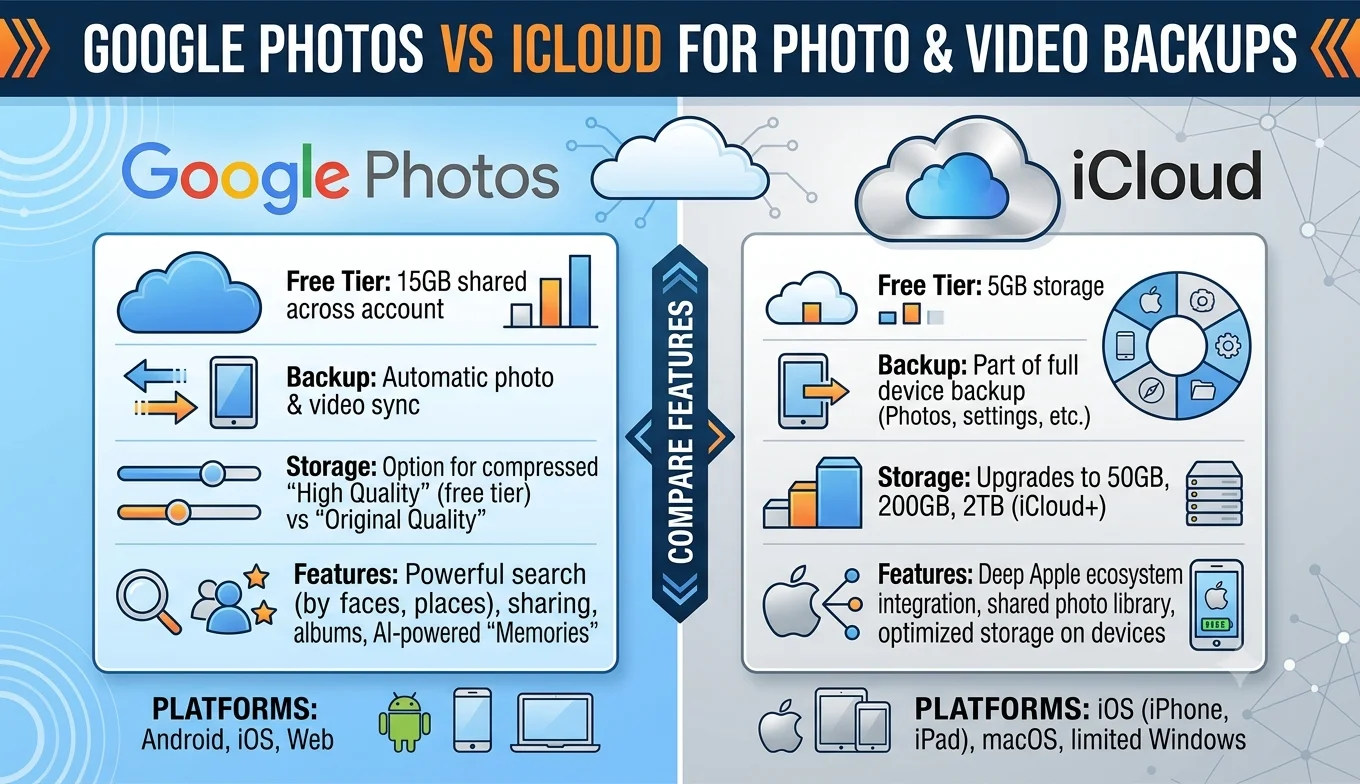
Comparing Google Photos vs iCloud for Backups
Google Photos generally offers better cross-platform access (working equally well on Android, iPhone, and any web browser) and stronger built-in search and organization tools, while iCloud integrates more tightly with the iPhone's native Photos app and offers a more seamless experience if you're fully inside Apple's ecosystem. Neither is strictly "better" the right choice depends on which devices you use and how you want to access your backup.
The Core Difference in Approach
Google Photos is designed to work identically regardless of which phone or computer you're using, with the assumption that you might mix Android, iPhone, and desktop access. iCloud Photos, by contrast, is built around deep integration with Apple's own Photos app across iPhone, iPad, and Mac, with web access available but functioning more as a secondary access point than the primary experience.
Storage Plans and Pricing Structure
- The Core Difference in Approach
- Storage Plans and Pricing Structure
- Cross-Platform Accessibility
- Organization and Search Tools
- Downloading Your Backup
- Sharing and Collaboration Features
- Video Handling and Quality
- Privacy and Data Handling Approaches
- Handling Family Sharing and Multiple Accounts
- What Happens If You Stop Paying for Storage
- Editing Tools Built Into Each Platform
- Which One Fits a Mixed-Device Household Better
- Can You Use Both at Once?
- Migrating Between the Two
- Conclusion
Both services offer a limited amount of free storage before requiring a paid subscription, with paid tiers scaling up based on how much total storage (photos, videos, and in Google's case, other account data like Gmail and Drive) you need. Google Photos storage is shared across your broader Google Account, meaning your photos compete for space with emails and files stored in Drive. iCloud storage is similarly shared across your Apple ecosystem device backups, iCloud Drive, and Photos all draw from the same storage pool. Neither service segments photo storage into something entirely separate from your other account data, so it's worth checking your total usage across services, not just photos, when deciding on a plan size.
Cross-Platform Accessibility
This is one of the more clear-cut differences. Google Photos works as a dedicated app on both Android and iOS, and is fully accessible through any web browser regardless of operating system. iCloud Photos works natively and seamlessly on Apple devices, and does offer a web interface (icloud.com) for access from Windows or Android, but the experience there is noticeably more limited compared to using it on an actual Apple device. If you regularly switch between Android and iPhone, or share photo access with people using different device ecosystems, Google Photos' consistent cross-platform behavior is a meaningful advantage.
Organization and Search Tools
Google Photos has invested heavily in automatic organization searching by object, location, or even specific people (with face grouping) tends to be fast and accurate, and features like automatically generated albums or highlights are a core part of the experience. iCloud Photos also offers search by content and people, along with Apple's own "Memories" feature generating retrospective collections, but the underlying search capability has historically been considered somewhat less robust for free-text or object-based search compared to Google's tools, which draw on Google's broader search and image-recognition infrastructure.
Downloading Your Backup
Both platforms support downloading your content as an independent backup:
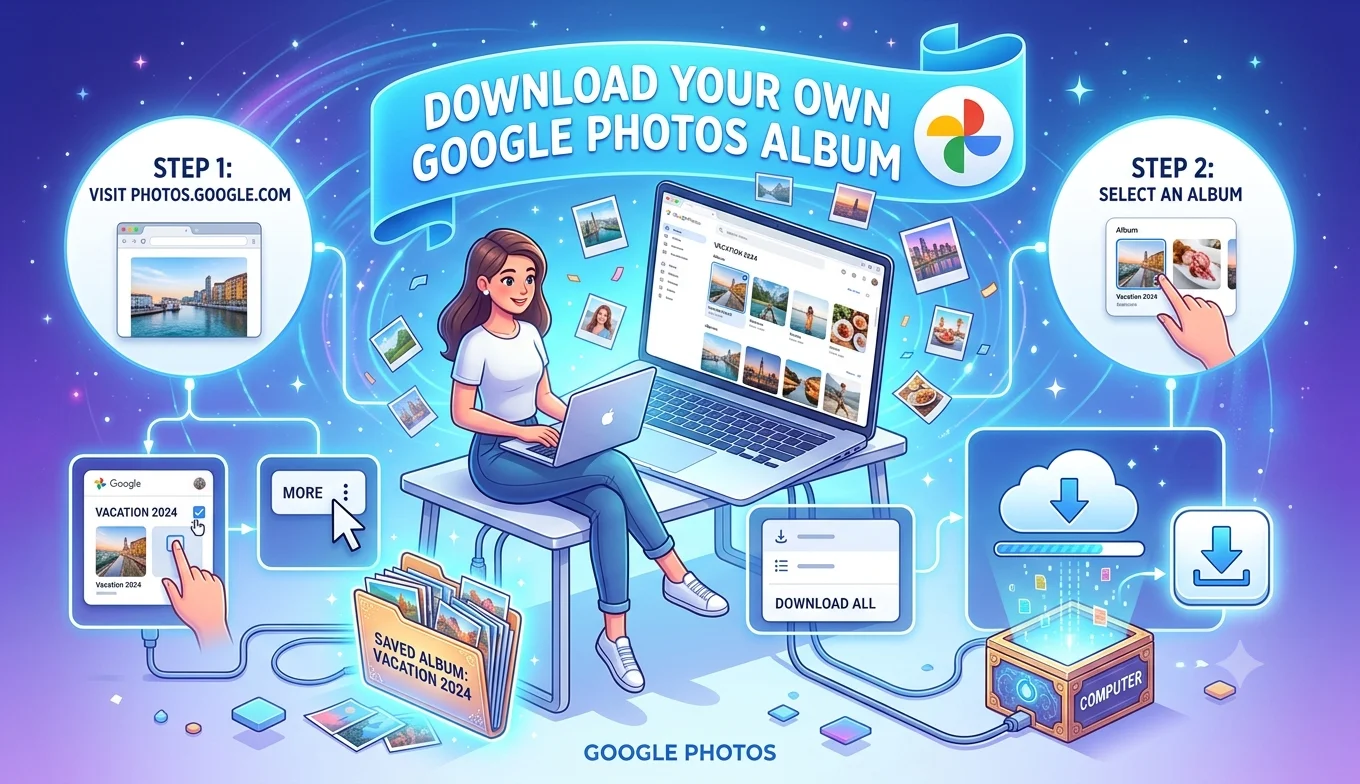
- Google Photos lets you download individual photos, entire albums via "Download all," or your complete library through Google Takeout.
- iCloud Photos lets you download individual photos and videos through the Photos app or icloud.com, and supports a full data export through Apple's Data and Privacy portal, which includes your Photos library among other Apple account data.
Neither requires a third-party tool to get a genuine, independent copy of your backed-up content both platforms treat data portability as a built-in feature rather than something you need external software to achieve.
Sharing and Collaboration Features
Google Photos' shared albums allow multiple people (regardless of their device type) to contribute photos to a shared collection, which is particularly useful for group events like weddings or trips where attendees are using a mix of Android and iPhone devices. iCloud's Shared Albums work similarly but are generally smoother when all participants are using Apple devices, with a more limited experience for anyone joining from Android or a browser.
- Best Practices for Backing Up Facebook Memories
- Facebook Save Option Not Showing Up
- Facebook Data Download Tool
- How to Download Your Own Google Photos Album
Video Handling and Quality
Both services support high-resolution photo and video backup, with quality tiers that can affect how much storage a given library consumes. Google Photos' historical "high quality" (compressed) storage tier, once free and unlimited for many users, was phased out industry-wide as photo and video file sizes have grown, meaning most Google accounts today draw from the same paid storage pool for every photo and video, regardless of quality setting. iCloud has generally maintained a more straightforward original-quality-only approach without a separate compressed tier, which simplifies the storage/quality tradeoff but means high-resolution video content consumes storage space consistently.
Recommended Articles
 DEVICES AND STORAGE
 DEVICES AND STORAGE
Privacy and Data Handling Approaches
Both companies publish privacy policies detailing how photo data is used, and both offer options to disable features like face grouping or location-based search if you'd prefer not to have that analysis performed on your library. Google's broader advertising business model has historically drawn more public scrutiny regarding how account data across its various services is used, though Google Photos specifically has stated that photo content isn't used for ad targeting. Apple's business model, built more around hardware and services revenue rather than advertising, is often perceived as inherently more privacy-focused, though both companies are subject to similar data protection regulations (like GDPR) in regions where those laws apply, which sets a baseline of user rights and controls regardless of which service you choose.
Handling Family Sharing and Multiple Accounts
Apple's Family Sharing plan allows a shared iCloud storage pool across family members, with the option for a shared family photo album distinct from each person's individual library. Google's equivalent, Google One family plans, similarly allows storage sharing across accounts, alongside Google Photos' own shared album feature for collaborative collections. Both approaches let a household share a storage subscription cost rather than each person paying individually, though the exact mechanics of how shared storage is allocated differ slightly between the two ecosystems.
What Happens If You Stop Paying for Storage
If you exceed your free storage limit and choose not to renew a paid plan on either service, both generally restrict your ability to upload new content while typically preserving your existing library, rather than immediately deleting your photos. That said, policies around exactly how long content remains accessible without an active paid plan, and what happens to new photos once you're over the free limit, are worth reviewing directly on each platform's current terms, since these details can change and matter significantly if you're relying on a service for long-term storage without an ongoing subscription.
Editing Tools Built Into Each Platform
Both Google Photos and iCloud Photos include basic built-in editing tools cropping, filters, brightness and color adjustments directly within their respective apps, without needing a separate photo editor for simple touch-ups. Google Photos has generally offered more AI-assisted editing features (like automatic suggestions or object removal tools) as part of its ongoing feature rollout, while Apple's Photos app editing tools tend to integrate more directly with the broader iOS/macOS editing ecosystem, including consistency with edits made in other Apple apps.
Which One Fits a Mixed-Device Household Better
If your household mixes Android and iPhone users a common scenario for families or groups of friends Google Photos' consistent, full-featured experience across both platforms generally makes shared photo management simpler. If everyone in the group uses Apple devices exclusively, iCloud's tighter native integration reduces friction in daily use, since photos sync automatically into the same Photos app most Apple users are already comfortable with.
Can You Use Both at Once?
Many users do run both services simultaneously for example, relying on iCloud for the seamless native iPhone experience while also backing up to Google Photos as a secondary, cross-platform-accessible copy. This isn't the most storage-efficient approach, since it means paying for space on two services rather than one, but it does provide genuine redundancy: if one account is ever compromised or inaccessible, the other remains as an independent backup that doesn't rely on the same login credentials or company infrastructure.
Migrating Between the Two
If you're switching primary ecosystems (say, moving from Android to iPhone, or vice versa), both platforms support importing photos from the other Google Photos can import an iCloud export, and Apple's Photos app can import photos downloaded from Google Photos, since both ultimately deal in standard photo and video file formats that aren't locked to either specific service. The migration itself is usually more about the time it takes to transfer large libraries than any fundamental compatibility barrier between the two platforms.
Conclusion
Neither Google Photos nor iCloud is universally the better choice the decision comes down to which devices you and the people you share photos with actually use day to day. Google Photos wins on cross-platform consistency and search power; iCloud wins on native integration if you're fully inside Apple's ecosystem. Whichever you choose (or if you use both for redundancy), both platforms offer genuine, built-in ways to download and independently back up your content, which matters more for long-term data safety than which service you pick as your primary one.